系统之家一键重装系统 > 电脑故障百科 >
windows7如何连接网络 windows7如何连接网络方法介绍
- 作者:重装大师
- 时间:2022-12-17 06:54:27
windows7如何连接网络呢,用户们使用win7的过程中肯定遭遇过没有连接网络的情况,有的时候是断网有的时候是退出了网络,那么如何将win7连接上网络成了很多人的问题,那么下面就带来了windows7如何连接网络方法介绍的内容,相信用户们看了之后就知道如何进行连接网络了。
windows7如何连接网络
1、点击电脑通知栏中的“网络”图标,即可打开“网络与共享中心”。

2、在“网络与共享中心”里,点击“设置新的连接或网络”。

3、点击“连接到Internet”。
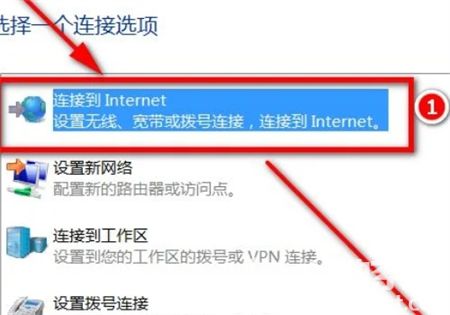
4、点击“宽带(PPPoE)”。

5、输入宽带账号和密码,点击“连接”即可。

以上就是windows7如何连接网络的内容了,希望可以帮到大家。